
Introduction to PreventionCloud
Maintaining a healthy lifestyle is not always as simple as knowing what to do. Many people understand that regular movement, balanced eating, sufficient sleep, and stress management are important, yet fitting these habits into everyday life can be difficult. Work schedules, family responsibilities, limited time, and a lack of motivation can make consistency a challenge. Digital wellness platforms aim to make these routines easier to organize, track, and maintain.
PreventionCloud is a digital health and wellness platform associated with Zomo Health. It provides tools intended to help people participate in wellness activities, monitor selected lifestyle habits, complete assessments, and engage with programs designed to encourage healthier routines. The platform is available through a website and a mobile application, allowing eligible users to access wellness features through different devices.
The idea behind a platform like PreventionCloud is straightforward: people may find it easier to maintain healthy habits when they can set goals, see their progress, participate in activities, and receive encouragement along the way. Rather than relying entirely on memory, users can use digital tools to keep track of selected activities and engage with wellness resources.
However, a wellness platform is not a replacement for professional medical care, and using an application does not automatically produce better health outcomes. Its value depends on how the tools fit into a person’s routine, what features are available through their program, and whether the information helps them make practical decisions.
This guide explains what PreventionCloud is, how its features work, who may benefit from it, how to approach activity tracking, and what users should understand about privacy and account access.
What Is PreventionCloud?
PreventionCloud is a digital platform designed to support health engagement, wellness activities, and population health management. Its broader purpose is to help organizations provide wellness resources and encourage participation in activities that support healthier everyday behavior. The company describes its technology as a way to assess health-related needs, encourage engagement, and measure participation and results.
The platform is associated with workplace and organizational wellness programs. Depending on the program, eligible participants may have access to lifestyle assessments, personal wellness plans, activity challenges, incentives, educational resources, and tools for monitoring selected habits.
For an employee, PreventionCloud may serve as a place to check available activities and follow progress. For an organization, the platform may help coordinate wellness initiatives and understand participation across a group.
The precise experience is not necessarily identical for every user. Organizations may offer different benefits, and some features may depend on account eligibility or program configuration. Anyone trying to access the platform should follow the instructions provided by their employer or program administrator rather than assuming that every feature will be available automatically.
Why Digital Wellness Platforms Matter
A wellness program can be difficult to maintain when people do not know where to begin or how to measure their progress. Someone might want to walk more regularly, improve their daily routine, or become more aware of their lifestyle habits but struggle to turn that intention into a consistent plan.
Digital wellness platforms can provide structure. They may bring assessments, activity goals, educational material, reminders, and progress information together in one place.
Turning General Goals Into Practical Actions
A goal such as becoming healthier can feel too broad to guide daily decisions. A more specific goal is easier to understand and act upon.
For example, a person might decide to take a short walk during a lunch break, establish a regular bedtime, or set aside time for relaxation. The appropriate goal depends on their circumstances, preferences, and individual needs.
A digital platform can help users record activities or follow a structured challenge. Seeing progress over time may make a routine easier to understand and encourage people to continue.
Still, the platform should support realistic behavior rather than create unnecessary pressure. Missing a daily target does not mean that someone has failed. The more useful question is whether a routine remains practical and sustainable over time.
Encouraging Participation
Wellness activities can be more engaging when participants have a clear objective. Challenges, milestones, and rewards may give users a reason to return to the platform and continue working toward their goals.
PreventionCloud lists interactive challenges and incentives among its features. Their availability and exact rules may vary according to the program.
These features can make participation more structured, but users should focus on activities that suit their circumstances. A competition or reward should not encourage someone to ignore pain, exercise beyond their ability, or make unhealthy decisions just to achieve a target.
Supporting Organizational Wellness
Employers and other organizations sometimes introduce wellness programs to provide resources that employees can use to explore healthier habits. A digital platform can help bring activities and educational material together while giving participants a convenient way to engage.
The success of such a program depends on more than the software itself. Clear communication, accessible resources, appropriate privacy practices, and a supportive workplace environment all matter.
Employees should be able to understand what the program offers, which activities are optional, and how their information will be handled.
Main Features of PreventionCloud
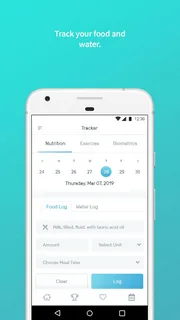
PreventionCloud’s mobile application description identifies several wellness tools, including lifestyle assessments, personalized plans, interactive challenges, incentives, daily activity tracking, emotional well-being resources, movement videos, events, quizzes, and in-app chat. The precise features accessible to an individual can depend on the account and program.
Lifestyle Assessments
A lifestyle assessment gives users an opportunity to reflect on aspects of their daily routines. Depending on the assessment, questions may concern activity, general habits, or areas where a person would like to make changes.
The purpose of an assessment is to provide a starting point for reflection. It can help users consider which habits they want to focus on rather than attempting to change everything at once.
For example, someone who spends most of the working day sitting may decide to explore ways to include more movement in their routine. Another person may want to develop a more consistent sleep schedule.
An assessment should not be confused with a medical diagnosis. It is a wellness tool, and any concerns about symptoms, illnesses, or treatment should be discussed with an appropriately qualified healthcare professional.
Personalized Wellness Plans
Personalized plans can help turn a broad intention into smaller actions. A user may have a particular activity goal or want to develop a more consistent daily routine.
A structured plan can make it easier to identify the next step, follow progress, and review whether an activity is manageable.
The word personalized does not mean that every recommendation is necessarily medically tailored. Users should read the plan carefully and consider whether its activities suit their abilities and circumstances. People with medical concerns or restrictions should seek appropriate professional guidance before making significant changes to exercise or other health-related routines.
Interactive Challenges
Challenges provide a structured activity that users can work toward over a defined period. They may focus on movement, participation, or other wellness-related behaviors.
A challenge can make a routine more engaging because it gives the participant a specific objective. For example, an activity-based challenge might encourage users to record movement consistently rather than relying on memory.
The most useful challenges are realistic and flexible enough to fit everyday life. They should encourage steady participation instead of promoting excessive competition.
If a challenge involves physical activity, participants should adapt their efforts to their own abilities and follow relevant medical advice.
Incentives and Rewards
PreventionCloud lists incentives as one of its engagement features. These are intended to recognize participation or progress toward selected activities.
The details of an incentive program depend on the organization offering it. Users should check the official program rules to understand which activities count, what deadlines apply, and whether any additional requirements must be completed.
It is sensible to view rewards as an additional source of motivation rather than the sole reason for maintaining a healthy routine. Habits are generally easier to sustain when they also fit a person’s daily needs and preferences.
Daily Activity and Routine Tracking
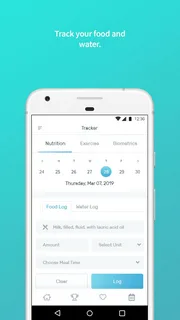
Tracking is one of the most practical uses of a wellness application. Instead of estimating how active they have been, users may be able to record selected activities and review their progress.
PreventionCloud describes tools for monitoring daily habits, including activity-related information and selected body measurements. Its Android application listing also explains that optional Google Health Connect integration can read step-count data, with permission, to display daily steps, support activity challenges, and show trends. The listing states that this integration is read-only and does not modify the underlying health data.
Tracking can help people notice patterns. Someone might discover that they move more on days when they take a walk during a break, or that their activity changes depending on their work schedule.
The information is most useful when viewed in context. One low-activity day does not necessarily indicate a problem, just as one highly active day does not establish a long-term pattern. Reviewing information over time can offer a more balanced picture.
Emotional Well-Being Resources
Emotional well-being is an important part of everyday life. Work pressures, family responsibilities, and unexpected events can affect how people feel and how easily they maintain their routines.
PreventionCloud lists emotional well-being and mindfulness-related tools among its app features. These may provide opportunities for relaxation or reflection, depending on the program and version being used.
Simple activities such as taking a quiet break, practicing a relaxation exercise, or making time for a personally meaningful activity may fit into a broader wellness routine.
However, general wellness resources are not a substitute for mental health care. If someone experiences persistent emotional distress or feels unable to manage everyday life, speaking with a qualified professional may be appropriate.
Fitness and Movement Videos
Guided movement videos can help users explore exercises or activity routines. They may be useful for people who prefer to follow a demonstration rather than plan every movement independently.
Before following a video, users should consider their experience, physical ability, available space, and any relevant health restrictions. A routine designed for one person may not be suitable for another.
It is also important to stop if an activity causes concerning symptoms and to seek medical advice when needed. No video should be treated as a guarantee that a particular exercise is safe for everyone.
Events and Quizzes
Events can help participants discover organized wellness activities, while quizzes may offer an interactive way to review information.
These features can make a digital program feel less like a checklist and more like an ongoing activity. They may also help participants explore subjects they would otherwise overlook.
The practical value depends on the quality and relevance of the material. Users should consider whether an event fits their interests and whether the information in a quiz is clear and appropriate for its intended purpose.
In-App Chat
The PreventionCloud application lists in-app chat as a feature for helping users find answers and navigate the platform.
A support feature can be useful when someone is unsure how to find a particular activity, understand a menu, or access a program resource.
For account problems, users should avoid sending passwords or unnecessary sensitive information through messages. If an issue involves eligibility, personal data, or a workplace benefit, the official support channel or program administrator may be able to provide more specific assistance.
How to Get Started With PreventionCloud
The first steps depend on whether someone already has an account through an employer or another participating organization.
Confirm Your Eligibility
Before trying to create an account, determine whether your organization offers PreventionCloud and whether you are eligible to participate.
Some workplace wellness platforms are available only to people enrolled in a particular program. In such cases, the organization may provide login instructions or an invitation.
If you cannot find a registration option, do not assume that the website is broken. Account creation may be controlled by the organization operating the program.
Use the Correct Website or Application
PreventionCloud has a mobile application listed on Google Play under the developer Zomo Health, LLC. The listing provides a support contact and identifies the application as a health and fitness product. <Cite refs={[“turn432449search0″,”turn432449search2”]}/>
Users should verify the application name and developer before installing it. This is a useful precaution whenever an app handles account information or personal wellness data.
If your employer provides a direct link or QR code, follow the official instructions and confirm that they lead to the expected service.
Follow the Provided Login Instructions
If you already have an account, use the credentials supplied through your program. Enter them carefully and check whether your organization has specific login instructions.
If you cannot sign in, avoid repeatedly guessing passwords. Use the official account-recovery process or contact support.
Some users may need assistance from their employer or program administrator if the account has not been activated correctly.
Explore the Available Features
After logging in, take time to understand the menu and identify which activities are available.
You might begin with a lifestyle assessment, review the wellness plan, explore an activity challenge, or read the program’s instructions. There is no need to activate every feature immediately.
Start with the tools that match your goals and the time you can reasonably devote to them.
Set Realistic Expectations
A wellness application works best as a support tool rather than a complete solution. It can help organize activities and record selected information, but lasting changes still depend on daily decisions and circumstances.
Choose a small number of manageable goals. Review your progress periodically and adjust your routine when necessary.
If a feature does not seem relevant, check whether it is optional or required by your program before deciding what to do next.
Activity Tracking and Connected Devices
Many people use phones, watches, or fitness trackers to record daily movement. Connected devices can reduce the amount of information users need to enter manually, but they may also introduce setup and compatibility issues.
PreventionCloud’s Android listing describes an optional integration with Google Health Connect for step-count information. Users must grant permission for this access, and the listing states that the app uses the data for displaying steps, activity challenges, and progress trends. <Cite refs={[“turn432449search0″,”turn432449search2”]}/>
Understanding Step Counts
A step count is a simple measure of movement, but it does not tell the whole story about a person’s health or fitness.
Someone may have a physically demanding job but take relatively few recorded steps, while another person may record many steps during a planned walk. The meaning of the number depends on the person’s circumstances.
It is usually more helpful to compare your own activity patterns over time than to assume that everyone should reach the same target.
Connecting a Device
If a program supports a connected device or health platform, follow the setup instructions carefully.
Check which app must be installed, whether the device is compatible, and which permissions are required. If the platform uses an integration service, confirm that the relevant permissions are enabled.
Allow some time for data to appear after setup. A delay does not always mean that something is broken, although repeated failures may require troubleshooting.
When Synchronization Does Not Work
Connected services can occasionally fail to transfer information as expected. The problem may involve device permissions, account settings, software versions, or an interruption in the connection between services.
A sensible troubleshooting process includes checking that the correct account is active, reviewing permissions, updating the relevant applications, and following the official instructions for reconnecting the service.
If the issue continues, contact the platform’s support team. Explain what you expected to happen, which device or service you use, and what error appears. Do not include your password in a support request.
PreventionCloud and Workplace Wellness Programs
Workplace wellness programs are intended to make health-related resources accessible to employees. Their design varies by organization, and not every employer offers the same activities or benefits.
PreventionCloud’s platform description connects its technology with population health management and engagement in wellness activities.
Participation and Communication
Clear communication is important when an employer introduces a wellness platform. Employees should know how to register, which features are available, and whom to contact when they need help.
Instructions should be easy to follow, especially for people who are not comfortable with new technology.
Organizations can also benefit from explaining the purpose of each activity. Participants are more likely to understand a program when they know what it is designed to achieve and how their involvement fits into the overall initiative.
Incentive Requirements
Some workplace programs include incentives or require certain activities for eligibility under the employer’s rules. The requirements can differ, so users should consult their own program documentation rather than relying on general information found online.
Check deadlines, completion criteria, and any conditions that apply before assuming an activity has been recorded successfully.
If an incentive or benefit appears to be missing, keep a record of the relevant activity and contact the program administrator through the official channel.
Privacy in the Workplace
Wellness information can be personal. Employees should understand what information the platform collects, what is shared with their employer, and how that information is used.
The details depend on the program, applicable policies, and relevant laws. Users should review the privacy notice and any employer-specific documentation instead of assuming that all wellness information is handled in the same way.
Organizations should also communicate clearly about privacy. A wellness program should make its participation rules and information practices understandable to the people using it.
Privacy and Personal Information
Privacy is an important consideration for any application that handles wellness-related information. Before using PreventionCloud, users should understand which permissions they are granting and what the application says it does with the information it accesses.
The Google Play listing describes optional Health Connect access for step counts and states that this access is read-only. It also says that the app does not use the information for medical purposes. Users should review the current privacy policy and permission screens for the version they install, since disclosures and practices can change.
Review App Permissions
When an application requests access to information from another service, consider whether the permission is necessary for the feature you want to use.
If you do not want to connect a health platform, check whether the app can still be used without that integration. Some features may require permission, while others may operate independently.
You can also review or revoke permissions through your device settings. Before doing so, consider whether the change will affect a feature you actively use.
Protect Your Login Details
Use a unique password for your account and avoid sharing it with other people. If your organization provides account credentials, follow its security instructions and use official recovery procedures when needed.
Be cautious of messages that request passwords, verification codes, or unnecessary personal information. If a message claims to come from support, confirm that it uses a legitimate communication channel.
Understand What the Platform Is Designed to Do
A wellness application may record activity or provide general lifestyle resources, but that does not make it a medical record system or diagnostic service.
Do not assume that information entered into the platform is being reviewed by a clinician. If you need medical advice or have concerns about symptoms, use an appropriate healthcare service.
Common Problems and How to Approach Them
Technology can make a wellness program easier to access, but it can also create difficulties when login, navigation, or synchronization does not work as expected.
Login Problems
If you cannot log in, first check the spelling of your username and password and confirm that you are using the correct sign-in page.
If your credentials are correct but access still fails, try the official password-recovery process. If the account was provided by an employer, the administrator may need to confirm your eligibility or activate the account.
Avoid creating duplicate accounts unless the program specifically instructs you to do so.
Missing Activities or Challenges
If an activity does not appear, check the program instructions and make sure you are viewing the correct section.
Some features may depend on account eligibility, program timing, or the way the employer has configured the platform. A missing option does not necessarily mean that your account is damaged.
If you believe a required feature should be available, contact support with a clear description of the issue.
Activity Data Is Not Updating
If your step count or other supported activity information is not appearing, review the connected service’s permissions and confirm that the correct account is linked.
Check whether the data appears in the original health or fitness application. This can help determine whether the problem is with the device, the connection, or the destination platform.
If the issue continues after following the official setup instructions, contact support rather than repeatedly disconnecting and reconnecting accounts without a clear plan.
Slow Loading or Application Errors
Slow screens or unexpected errors can sometimes be related to network conditions, an outdated application, or a temporary service issue.
Try a stable internet connection, check for updates, and reopen the application. If a problem persists, note which screen is affected and whether an error message appears.
The application listing reports updates intended to improve event performance, login behavior, stability, and reliability. However, no update can guarantee that every technical issue will be resolved for every user.
How to Make Better Use of a Wellness Platform
The value of PreventionCloud depends largely on whether the tools help users develop a routine that makes sense for their lives.
Begin With One Priority
It is tempting to explore every feature at once, but a simpler approach may be easier to maintain.
Choose one area you would like to focus on, such as movement, routine tracking, or participation in a wellness activity. Learn how the relevant feature works before adding more goals.
A focused beginning can make the experience less confusing and help you understand whether the tool is useful.
Review Progress Without Obsessing Over Numbers
Tracking can provide helpful feedback, but numbers should be interpreted sensibly.
Daily activity varies with work, travel, family responsibilities, weather, and many other factors. One unusually busy or quiet day does not define a person’s overall routine.
Look for patterns over a reasonable period and consider what changes are realistic. The purpose of tracking is to support decisions, not to make every day a competition.
Choose Activities That Fit Your Life
A routine is easier to maintain when it works with your schedule and preferences. Someone who dislikes structured workouts may prefer regular walks, while another person may enjoy guided movement sessions.
The most suitable activity depends on individual circumstances. It should be practical, appropriate for your ability, and enjoyable enough to repeat.
If you have a medical condition, significant symptoms, or restrictions on physical activity, consult a healthcare professional about appropriate options.
Use Educational Resources Thoughtfully
Quizzes, videos, assessments, and other learning features can help users explore wellness topics. Treat them as starting points for learning rather than as a replacement for reliable medical guidance.
For decisions involving diagnosis, medication, treatment, or persistent symptoms, consult an appropriate healthcare professional.
Ask for Help When Needed
If a feature is confusing or does not work, use the official support options. A clear explanation of the issue usually makes it easier for support staff to investigate.
For example, state whether you are unable to sign in, cannot find a challenge, or cannot connect a supported device. Include relevant non-sensitive details, but never send your password.
Who May Benefit From PreventionCloud?
The platform may be useful for people who are eligible for a participating wellness program and want a central place to explore activities and monitor selected habits.
Employees may use it to find available resources, participate in challenges, or check program requirements. Organizations may use the underlying platform to coordinate wellness activities and encourage engagement.
People who enjoy recording progress may appreciate the activity-tracking features, while those who prefer structured activities may find challenges or guided content more engaging.
However, no digital platform suits every person. Some users prefer paper records, face-to-face programs, or other tools. The important question is whether the available features are useful and accessible for the individual.
Anyone considering the platform should confirm eligibility and understand the program’s terms before relying on it for a particular workplace benefit.
PreventionCloud Compared With General Fitness Apps
Many fitness applications focus mainly on workouts, activity tracking, nutrition logging, or exercise planning. A workplace-oriented wellness platform can have a broader role by combining selected lifestyle resources with organized programs and participation features.
PreventionCloud lists assessments, plans, challenges, incentives, emotional well-being resources, events, and activity tracking among its app features. The precise mix available to a user depends on the service and program configuration.
The main difference is the context in which the tools are used. A general fitness app may be selected independently by an individual, while an organizational wellness platform may be offered through an employer or participating program.
Neither type is automatically better. The right option depends on what the person wants to accomplish, how easy the tool is to use, and whether it provides the features they actually need.
The Future of Digital Wellness Platforms
Digital wellness tools continue to develop as people become more familiar with mobile applications, connected devices, and online resources.
Platforms may increasingly combine activity tracking, educational content, personalized engagement, and ways for organizations to coordinate wellness activities. Such tools can make it easier to access information and review selected patterns over time.
At the same time, responsible data handling will remain important. As digital services become more connected, users need clear information about permissions, data sharing, retention, and the purpose of each feature.
Accessibility also matters. A useful wellness platform should be understandable to people with different levels of technical experience and should not assume that every participant has the same devices, schedule, or physical abilities.
The best digital wellness experiences will be those that support realistic behavior, communicate clearly, protect personal information, and recognize that people’s circumstances differ.
Frequently Asked Questions About PreventionCloud
What is PreventionCloud used for?
PreventionCloud is a digital health and wellness platform associated with Zomo Health. It provides tools for wellness engagement, lifestyle assessments, selected activity tracking, challenges, and related resources. Available features depend on the user’s program and account.
Is PreventionCloud a mobile application?
Yes. PreventionCloud has a mobile application listed on Google Play. Its description includes wellness assessments, personalized plans, challenges, incentives, activity tracking, and other engagement features.
Who can use PreventionCloud?
Access may depend on whether a person’s employer or another participating organization offers the platform. If you are unsure whether you are eligible, check with the organization that provided the program information.
Does PreventionCloud track daily steps?
The application description identifies daily activity tracking and optional Google Health Connect integration for step-count information. Users must grant the relevant permissions, and the current app listing should be checked for the latest details.
Can PreventionCloud diagnose a medical condition?
It should not be treated as a diagnostic service. The application listing states that the described Health Connect data is not used for medical purposes. For diagnosis or treatment, consult a qualified healthcare professional.
What should I do if I cannot log in?
Check your credentials, use the official account-recovery process, and contact the platform’s support team if the issue continues. If your account is connected to an employer program, the program administrator may also need to help.
Does PreventionCloud offer incentives?
The app description lists incentives among its features. The specific rewards and requirements depend on the participating program, so users should check their official program documentation.
Can I connect a fitness device?
The Android listing describes optional integration through Google Health Connect for step-count information. Compatibility and setup depend on the device, connected service, permissions, and application version.
How can I protect my privacy when using PreventionCloud?
Review the current privacy policy and requested permissions, use a strong password, and avoid sharing login details. If the platform is offered through an employer, read the program’s explanation of how information is used and shared.
Is PreventionCloud suitable for everyone?
Not necessarily. Its usefulness depends on access, individual preferences, available features, and personal circumstances. Users should choose activities appropriate to their abilities and seek professional guidance when they have medical concerns.
Conclusion
PreventionCloud brings together digital tools designed to support wellness engagement, lifestyle reflection, activity tracking, and participation in organized programs. Its listed features include assessments, personalized plans, challenges, incentives, movement resources, emotional well-being activities, and optional activity-data integration.
For eligible users, the platform can provide a convenient place to explore available resources and keep track of selected routines. Its usefulness depends on the quality of the program, the relevance of the activities, and whether the tools fit naturally into everyday life.
The most practical approach is to begin with a manageable goal, understand how the available features work, and review progress without treating every number as a measure of success. Users should also pay attention to account security, permissions, and the privacy terms that apply to their particular program.
Ultimately, digital wellness tools are most helpful when they support sensible habits rather than replace personal judgment or professional care. PreventionCloud can be part of a broader approach to wellness, alongside realistic daily routines, appropriate health guidance, and a supportive environment.









Leave a Reply