

Finding a time that works for everyone sounds simple until you actually try to organize a meeting. One person is free in the morning, another is available after work, and someone else can only join on the weekend. Group chats quickly become filled with messages such as “What time works for you?” and “I can do Tuesday, but not Wednesday.”
This is where when2meet can make scheduling much easier. Instead of going back and forth with every person individually, a group can use a shared availability page to see when people are free. The idea is straightforward: choose possible dates and times, share the link, and let everyone mark their availability.
For students, coworkers, friends, clubs, project teams, and many other groups, this approach can save time and reduce unnecessary communication.
What Is When2Meet?
When2Meet is an online scheduling tool designed to help groups find a convenient time for an event or meeting. Rather than asking each participant to send their availability separately, the organizer creates a scheduling page and shares it with the people who need to participate.
Participants can then select the dates and time periods that work for them. As more people respond, the availability information becomes easier to compare.
The main concept behind the service is simple: show everyone’s availability in one place.
There is no need to create a complicated spreadsheet or collect dozens of individual messages. A group can look at the shared schedule and identify periods where several participants are available at the same time.
Why Group Scheduling Can Be Difficult

Scheduling becomes surprisingly complicated when several people are involved.
Imagine that six people need to attend a project meeting. One person works during the day, another has classes in the afternoon, and another has family responsibilities in the evening. If everyone communicates their schedule through a messaging app, the organizer may have to manually compare every response.
That process can lead to confusion.
Someone may say they are available “after 5,” while another person may only be free on certain days. After several messages, it becomes difficult to remember who is available when.
A shared scheduling tool changes this process by putting the information into one visual space.
Instead of interpreting individual messages, the organizer can look at the availability grid and search for an overlapping time.
How When2Meet Works
The basic process is relatively easy to understand.
First, the organizer creates a new event or scheduling page. They select the dates that should be considered and choose the general time range.
After creating the schedule, the organizer shares the generated link with the participants.
Each participant opens the page and enters a name or identifier before selecting the periods when they are available.
As people complete their responses, the schedule begins to show the combined availability of the group.
The organizer can then examine the results and find a time that works for the people who need to attend.
The process avoids a large amount of unnecessary discussion.
Creating a Scheduling Page
The first step is deciding what kind of meeting you are trying to arrange.
For example, you may need to organize:
- A study session
- A team meeting
- A project discussion
- A group presentation
- A club activity
- A training session
- A family gathering
- An online call
- A volunteer event
- A casual meetup
Once the purpose is clear, you can select appropriate dates and times.
It is usually better to provide a realistic range rather than an unnecessarily large calendar. If the meeting is expected to happen during one particular week, there is little reason to include several months of dates.
Keeping the choices focused makes it easier for participants to respond.
Sharing the Link With Participants
After creating the schedule, the organizer can share it with the group.
The link can generally be sent through the communication platform the group already uses. This could be email, a messaging app, a workplace chat, or a student group.
A short message is usually enough.
For example, an organizer might tell participants that they should open the scheduling page and mark all the times they can attend.
This is much easier than asking every person to type their entire weekly schedule into a chat.
Marking Your Availability
From the participant’s perspective, the important task is simply identifying the times they can attend.
A participant may have several available periods during the selected dates. They can mark those periods on the schedule.
It is useful to be honest about availability.
If someone marks a time as available even though they probably cannot attend, the final result can become misleading. The goal of the tool is to represent realistic availability rather than theoretical availability.
For that reason, participants should consider travel time, work commitments, classes, appointments, and other responsibilities before selecting their available periods.
Finding an Overlapping Time
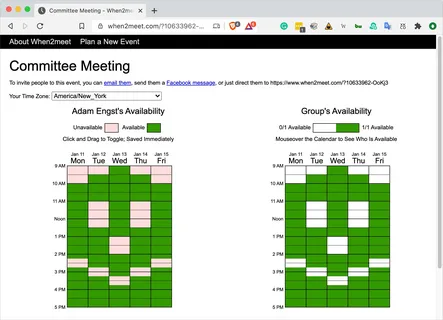
Once several people have completed the schedule, the organizer can compare the responses.
This is where the visual nature of the scheduling page becomes useful.
Instead of reading individual answers, the organizer can look for areas where many participants have indicated that they are available.
If the meeting requires everyone to attend, the organizer can focus on periods with complete or near-complete availability.
If only certain team members are essential, the organizer can prioritize their schedules.
This makes the final decision more practical.
When2Meet for Students
Students frequently have complicated schedules.
Classes, assignments, part-time jobs, sports, study sessions, and personal activities can all compete for the same hours.
When a group of students needs to work together, finding a common time can become frustrating.
A shared availability schedule can make group planning easier.
For example, five students preparing a presentation can list several possible afternoons. Each student marks the periods when they are free. The group can then identify the overlap instead of spending an hour discussing schedules through messages.
This can be especially helpful before exams or major project deadlines when everyone’s calendar is already busy.
Using It for Work Meetings
Work teams can also benefit from a visual availability system.
Remote teams often include people working from different locations or following different schedules. Even when everyone works similar hours, meetings can become difficult when calendars are crowded.
A shared availability page can be useful when a meeting needs to be arranged quickly and participants do not have a single common calendar.
For small teams, project groups, freelancers, and temporary collaborations, a simple scheduling page may be enough to find a suitable time.
Planning Online Meetings
Online meetings have made group communication easier, but scheduling them can still be difficult.
People may use different calendars and work in different time zones. Asking everyone to suggest a time can quickly create a long conversation.
A scheduling page gives participants a common place to enter their availability.
Once a suitable period has been identified, the organizer can create the actual online meeting using their preferred video conferencing platform.
In this situation, the scheduling tool handles the availability problem while the video platform handles the meeting itself.
Planning Social Events
Scheduling is not only a workplace problem.
Friends and family members often struggle to find a day when everyone is free.
Suppose a group of friends wants to have dinner together. One person is busy on Friday, another is unavailable Saturday afternoon, and another has plans Sunday morning.
Instead of asking everyone individually, the group can use a shared availability schedule.
The same approach can work for birthday celebrations, weekend trips, game nights, study groups, or community activities.
Why a Visual Schedule Is Helpful
People understand information differently when it is organized visually.
A long list of messages can contain the same information as a schedule, but it may take much longer to compare.
For example:
“I’m free Monday after six.”
“Tuesday works for me.”
“I can’t do Tuesday, but Wednesday is okay.”
“I can do Monday and Thursday.”
After enough responses, someone has to manually compare all of those statements.
A visual availability grid removes much of that work.
Participants can see the selected dates and time periods in a structured format, making overlapping availability easier to recognize.
Reducing Scheduling Messages
One of the biggest advantages of a shared scheduling method is reducing repetitive communication.
Without a scheduling tool, the organizer may have to send multiple messages:
“Can everyone do Monday?”
Then:
“What about Tuesday?”
Then:
“How about Wednesday evening?”
This can continue until everyone becomes tired of the conversation.
A single availability page can replace much of that back-and-forth.
Participants provide their information once, and the organizer can review the combined results.
When2Meet and Small Groups
Small groups are often ideal for this type of scheduling.
A group of three or four people can probably find a common time through conversation, but even small groups can experience scheduling problems when everyone’s calendar is busy.
For larger groups, the value of a shared availability page can become even more noticeable.
Instead of collecting responses individually, the organizer can give everyone the same page and let the schedule develop naturally.
When2Meet for Clubs and Organizations
Clubs and community organizations frequently need to coordinate people who have different schedules.
A club may need to arrange:
- Monthly meetings
- Planning sessions
- Volunteer activities
- Workshops
- Practice sessions
- Committee discussions
- Special events
A shared availability page can help organizers understand when members are generally available.
This does not replace proper event planning, but it can make the initial scheduling process much easier.
Using When2Meet for Project Teams
Project teams often have deadlines that require several people to work together.
Finding one common period can be difficult when team members have different responsibilities.
A scheduling page can help the team identify possible working sessions before choosing a final meeting time.
For example, a team may have a presentation due Friday. Instead of asking everyone to suggest times separately, the team can create availability options for Monday through Thursday.
After everyone responds, the team can select an overlapping period for preparation.
Tips for Better Scheduling
A few simple practices can make group scheduling more effective.
Give Participants Enough Options
If you provide only one possible time, you are not really comparing availability.
Offer several realistic options whenever possible.
Avoid Extremely Long Time Ranges
Too many choices can make the schedule harder to complete.
Focus on the dates and hours that genuinely make sense for the event.
Tell People What to Do
When sharing the link, explain exactly what participants need to complete.
A simple instruction such as “Please mark every time you can attend” can prevent confusion.
Set a Response Deadline
If the meeting is important, give participants a reasonable deadline for entering their availability.
This prevents the organizer from waiting indefinitely for one response.
Consider the Meeting Length
A one-hour meeting requires different scheduling than a three-hour workshop.
Make sure participants understand how long the planned event will last.
Avoiding Common Scheduling Mistakes
Scheduling problems often happen because participants misunderstand the requirements.
One common mistake is marking every possible time even when some periods would be inconvenient.
Another mistake is forgetting travel time.
Someone may technically be free at 4:00 PM but unable to attend a meeting that starts at 4:00 because they are still traveling home.
Remote meetings have their own considerations. Participants may need time to finish another call, prepare documents, or move to a quiet location.
Accurate availability produces better scheduling results.
Is a Scheduling Tool Better Than a Group Chat?
It depends on the situation.
For a simple meeting involving two people, a normal conversation may be enough.
For a larger group with multiple possible dates and times, a dedicated scheduling page can be much easier.
The main difference is organization.
A group chat is primarily designed for conversation. A scheduling tool is designed to collect and compare availability.
Both approaches can be useful, but they solve slightly different problems.
Keeping the Process Simple
Good scheduling does not need to be complicated.
The purpose of a tool such as when2meet is to reduce the amount of work required to find a common time.
The organizer should avoid adding unnecessary steps.
Choose realistic dates, select suitable hours, share the page, collect responses, and review the overlap.
Once a suitable time is found, communicate the final decision clearly to everyone involved.
Privacy and Shared Information
Whenever using an online scheduling service, participants should think about the information they are sharing.
A scheduling page generally requires only enough information to identify each participant’s response.
It is better to avoid entering unnecessary personal information.
For private meetings or sensitive events, organizers should also consider who has access to the scheduling link and whether the information displayed on the page should be visible to everyone involved.
Good digital habits are useful regardless of which scheduling service is being used.
When2Meet for Remote Teams
Remote work has made flexible scheduling more important.
A team may have members working from home, coworking spaces, offices, or different regions. Their daily routines may not match perfectly.
A shared availability schedule gives everyone a simple way to communicate when they can participate.
For recurring meetings, teams may also discover that certain days consistently work better than others.
This information can help them develop a more predictable meeting routine.
A Practical Example
Consider a team of six people preparing a website launch.
The team needs a one-hour meeting before the launch. Everyone has different responsibilities, so finding a suitable time through chat becomes difficult.
The organizer creates a scheduling page with several possible days.
Each person marks the times they are available.
After everyone responds, the organizer reviews the schedule and identifies an hour when the required team members can attend.
The organizer then sends the final meeting details to the group.
What could have required dozens of messages becomes a much simpler process.
The Main Idea Behind When2Meet
The usefulness of when2meet does not come from making scheduling complicated. It comes from making scheduling more organized.
People have different calendars. That will always be true.
The goal is not to make everyone’s schedule identical. The goal is to find the small areas where schedules overlap.
A shared availability page makes those areas easier to identify.
Final Thoughts
Finding a common time can be one of the most annoying parts of organizing a group activity. The larger the group becomes, the more difficult the process can feel.
When2Meet offers a straightforward approach by allowing participants to show their availability in one shared schedule. Instead of collecting individual responses and comparing them manually, organizers can view the information together and look for suitable overlaps.
Whether the purpose is a student project, work meeting, online discussion, club activity, family event, or casual gathering, organized availability can save time and reduce unnecessary communication.

The most important part is not simply creating a schedule. Participants need to provide accurate availability, organizers need to offer sensible options, and everyone should understand the expected meeting length and response deadline.
Used this way, a shared scheduling system can turn a frustrating group conversation into a much more manageable process.











Leave a Reply